How to Make the Ozil AI Goal Video
Last updated
To make the Ozil AI goal video here, upload one photo of the scorer, pick the outfit, model, quality, format and music, and pay with credits. About 5 minutes later you download a 15-second MP4 of that person (or pet) chipping the keeper, letting two defenders slide past and tapping into the empty net, with the trend music (or stadium sound only, if you choose No music) and no watermark.
Step 1: upload one photo
Open the generator and tap Upload photo: one person or one pet, facing the camera, as a JPG, PNG or WebP under 15 MB. The scorer's face and look come from this photo; the keeper, the defenders and the stadium are AI-made.
Tick the box confirming it's your photo or that you have permission. Photos of children, celebrities, footballers or other public figures aren't allowed.
Step 2: pick the outfit
- Keep my look: the scorer plays in the clothes from the photo. A suit or a hoodie is half the fun.
- Football kit: a plain football kit, with no club badge.
For a pet, the first option reads As in the photo.
Step 3: pick model, quality and format
Open the options under step 3 to change the defaults. The button shows the credit cost before you pay.
- Model: Standard, Fast, Pro or Ultra. All four are ByteDance's Seedance models (Seedance 2.0 Mini, 2.0 Fast, 2.0 and 2.5).
- Quality: Standard at 480p or HD at 720p.
- Format: 9:16 for TikTok and Reels, 1:1 for the Instagram feed, 16:9 for YouTube.
| Model | 480p | 720p |
|---|---|---|
| Standard | 5 credits | 10 credits |
| Fast | 10 credits | 20 credits |
| Pro | 15 credits | 35 credits |
| Ultra | 25 credits | 55 credits |
Not sure? Try Standard at 480p first, then make the 720p version from the same photo if you like it.
Step 4: pick the music
Music is the last setting in the same options:
- Trend music: the trend's soundtrack, licensed and laid over the film. This is the default.
- No music: stadium sound only: the crowd, the ball and the net. Pick this if you'd rather add a sound in the app when you post.
Step 5: pay with credits
Tap Make my goal. With enough credits, the video starts right away; otherwise pick a credit pack and pay through Stripe, no sign-up needed. Your photo and choices are kept, so rendering starts when you land back on the page. Packs are a one-time payment and leftover credits never expire: see all credit packs.
Step 6: wait about 5 minutes, then download
Rendering takes about 5 minutes, with progress shown on the page. You can close the tab: the link is emailed to your checkout address and the video is saved in My videos. When it's done, tap Download MP4, or Share on your phone. If a render fails, its credits go back to your account automatically.
A real render from this generator
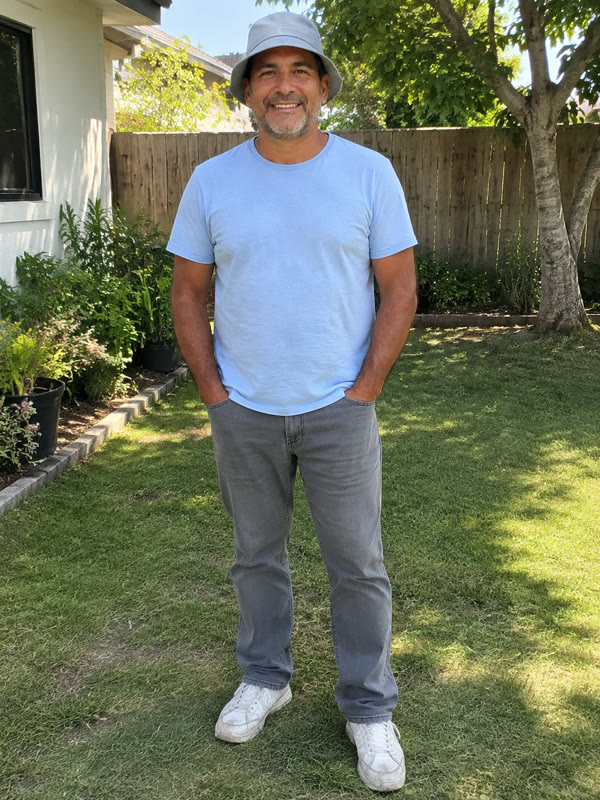 The photo it was made from
- Model
- Seedance 2.0 Mini
- Format
- 9:16 · 480p
- Length
- 15 s
- Rendered
The scorer and every other player are AI-generated and fictional. Customers' photos and videos are never shown here.
Photo tips: what to use and what to avoid
The model rebuilds the scorer from your photo in every shot, so a better photo gives a more recognisable scorer.
Use:
- One person or pet in the photo
- Face toward the camera, eyes visible
- Even daylight, no harsh shadows
- At least 720px wide, head and shoulders or full body
Avoid:
- Group photos, or friends cropped out of a group shot
- Sunglasses, masks and heavy filters
- Tiny, blurry or screenshot-of-a-screenshot images
A full-body photo helps when you pick Keep my look, because the model can see the whole outfit.
Before you post, label it as AI-generated; the Ozil goal meme guide has posting tips for TikTok and Reels.
Make your Ozil AI goal video from one photo
Upload one photo and get the finished Ozil goal in about 5 minutes. Credit packs from $9.99, no subscription required.
Make my Ozil goalFrom 5 credits a video · trend music · no watermark · failed render, credits back
FAQ
How long does it take to make the Ozil AI goal video?
About a minute to upload and pay, then about 5 minutes of rendering. You can close the page; the video is saved in My videos and the link is emailed to you.
Do I need an account?
No. You can pay through Stripe without signing up; the link goes to your checkout email, and signing in later with that email shows your videos in My videos.
How many credits does one video cost?
From 5 credits for the Standard model at 480p up to 55 credits for Ultra at 720p. Credit packs start at $9.99 for 10 credits, are a one-time payment and never expire.
What if the render fails?
Its credits go back to your account automatically, so you can try again with a clearer front-facing photo. If a finished video is clearly broken, contact support.
Can I make it with two people in the photo?
No. The goal has one scorer, so use a photo with one person or one pet in it. To put a friend in too, make a second video from their photo.